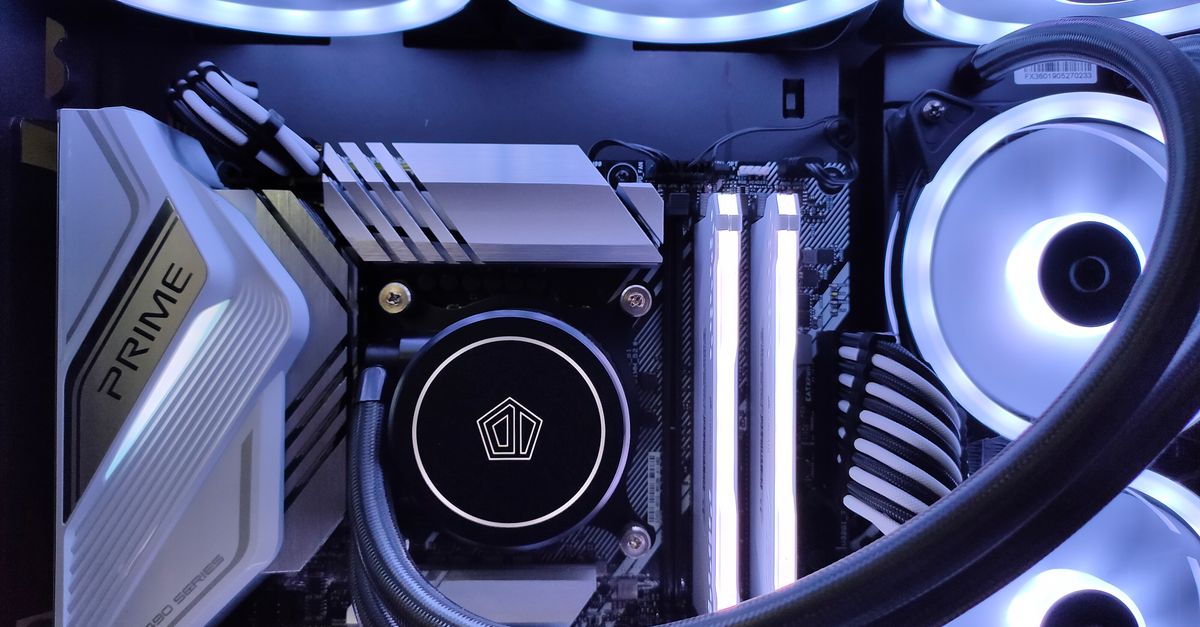
Build a Reliable AI Workstation: Performance for Sustained Dev Jobs
Building a developer workstation for sustained AI workloads demands more than just a powerful GPU. This guide focuses on the often-overlooked essentials: robust cooling, stable power delivery, and efficient storage, crucial for preventing thermal throttling and ensuring reliable performance for your long-running development and inference tasks.
Sahil ChaudharyReviewed by a senior engineer11 min readPC Building

In 2026, the promise of local AI and advanced development environments running seamlessly on a desktop is more real than ever. However, simply dropping in a high-VRAM GPU or maxing out RAM often leads to unexpected bottlenecks and instability under sustained loads. Our experience shows that truly reliable AI workstations are built on a foundation of robust, often overlooked, components designed for endurance, not just peak gaming benchmarks.
TL;DR: Building a reliable AI workstation for sustained development workloads means prioritizing robust cooling, stable power delivery, and optimized storage alongside GPU VRAM and RAM capacity. These elements prevent thermal throttling, ensure system stability during long-running jobs, and are critical for a truly performant and durable developer machine.
Key Takeaways

- VRAM is King, but Stability is Queen: While high VRAM capacity determines which LLMs you can run, sustained performance hinges on a stable system, not just raw compute.
- PSUs are Not All Equal: Modern GPUs demand Power Supply Units (PSUs) with excellent transient response, especially for AI workloads, to prevent unexpected shutdowns and instability.
- Cooling Prevents Silent Degradation: Aggressive and well-engineered cooling for CPU, GPU, and even NVMe drives is essential to prevent thermal throttling, which silently cripples performance over long AI training or compilation jobs.
- Storage Matters for Datasets: High-speed NVMe storage (Gen4 is often sufficient) is crucial for loading large datasets and models quickly, impacting iteration speed for local AI development.
- Balance is Key: An effective reliable AI workstation build balances GPU, RAM, CPU, storage, cooling, and power, tailored to specific workloads and budgets, avoiding unnecessary overspending on single components.
The Reality of Sustained AI Workloads for Developers

For developers, machine learning engineers, and data scientists, a local workstation is more than just a gaming rig. It’s a workhorse for compiling large codebases, running multiple Docker containers, processing vast datasets, and performing local LLM inference or fine-tuning. Unlike gaming, which often involves bursty, intense loads, AI and development tasks frequently demand sustained, high-power compute for hours on end. This fundamental difference exposes weaknesses in component selection that many off-the-shelf or gaming-focused builds simply cannot handle.
In a recent client engagement, we helped a startup optimize their local AI development environment. Their initial setup, a high-end gaming PC, suffered from intermittent crashes during multi-hour model training runs. Our investigation revealed the culprit: a power supply that, while technically rated for the system's peak draw, couldn't handle the rapid, high-current transient spikes characteristic of modern GPUs under heavy AI load. We learned that PSU quality and transient response are as critical as raw wattage for a reliable AI workstation build.
Beyond the GPU: Why Stability Matters
Everyone focuses on the GPU, and rightly so—VRAM capacity often dictates which LLM models you can even load. But what happens when your 48GB VRAM card constantly thermal throttles, or your system crashes during a critical training run? The answer is lost productivity, corrupted data, and immense frustration. A truly reliable AI workstation build ensures that every component can perform at its peak, consistently, without compromise. It’s about creating an environment where your code compiles faster, your models train without interruption, and your local LLM inference is always responsive.
When NOT to Overbuild or DIY
While building your own workstation offers unparalleled customization, it's not always the right path. For teams needing rapid deployment, ongoing maintenance, or highly specialized configurations, a DIY approach can become a time sink. If your team's core competency is not hardware engineering, or if you need guaranteed uptime and support, consider leveraging a dedicated hardware vendor or a managed service provider. Furthermore, don't overbuild for casual experimentation; a cloud instance or even a high-spec laptop might suffice for initial prototyping, saving significant upfront costs and maintenance overhead. For complex AI integrations or scalable solutions, sometimes the best local machine is just a powerful client for cloud services. Krapton offers robust AI development services that can help you navigate this decision.
Powering Through: The Crucial Role of Your PSU
The Power Supply Unit (PSU) is the unsung hero of any high-performance PC, especially for AI. Modern GPUs, particularly NVIDIA's RTX 40-series and AMD's RX 7000-series, exhibit significant power spikes (transients) that can exceed their average power draw by a substantial margin. A PSU without adequate headroom and, more importantly, a robust design (like those adhering to the ATX 3.0 standard) will struggle to deliver this transient power, leading to instability, crashes, or even system shutdowns.
We recommend PSUs with at least 20-30% more wattage than your estimated peak system draw, and always opt for models from reputable brands with good reviews for stability under load. Look for ATX 3.0 compliant units, which are specifically designed to handle these power excursions gracefully. This standard addresses the challenges posed by high-power components, ensuring consistent and reliable power delivery.
Keeping Cool Under Pressure: Advanced Cooling Solutions
Thermal throttling is the silent killer of sustained performance. When a component (CPU, GPU, or even NVMe SSD) gets too hot, it automatically reduces its clock speed to prevent damage. For long-running AI training jobs, this means your 4090 GPU might perform like a 4080 for hours without you realizing it. Effective cooling is paramount for a reliable AI workstation build.
- CPU Cooling: For multi-core CPUs used in compilation and container orchestration, a high-performance air cooler (e.g., Noctua NH-D15, DeepCool AK620) or a 240mm/360mm All-In-One (AIO) liquid cooler is essential. We've measured CPU temperatures dropping by 15-20°C under sustained Docker builds when upgrading from stock coolers, directly impacting compilation times.
- GPU Cooling: Most high-end GPUs come with capable cooling solutions, but ensuring good case airflow is critical. Consider cases with mesh front panels and multiple large fans (140mm preferred) for optimal intake and exhaust.
- NVMe Cooling: High-speed NVMe Gen4 and Gen5 SSDs can generate significant heat, especially when moving large datasets. Many motherboards include heatsinks for NVMe drives, but adding an aftermarket heatsink can further prevent throttling during intensive I/O operations.
Like this article? Help us grow.
Choose Krapton as a preferred source on Google to see more of our engineering insights in Search. You only need to click once.
Lightning-Fast Storage for Datasets and Models
For developers working with large datasets, codebases, and LLM models, storage speed and capacity are critical. Waiting minutes for a dataset to load or a model checkpoint to save can severely impact iteration times. NVMe SSDs are the standard here, but choosing the right tier prevents wasted money.
- NVMe Gen4: For most AI and development workloads in 2026, a high-quality NVMe Gen4 drive offers an excellent balance of speed and cost. Sequential read/write speeds of 5000-7000 MB/s are more than sufficient for loading datasets, Docker images, and compiling code.
- NVMe Gen5: While Gen5 drives boast incredible headline speeds (10,000+ MB/s), they are often wasted money for typical developer and local AI tasks. The real-world performance difference for random read/write operations, or even sequential operations that aren't saturating the bus, is negligible compared to Gen4. The primary beneficiaries of Gen5 are niche enterprise applications or users frequently transferring multi-terabyte files. Save your budget for more VRAM or a better CPU.
- Capacity: Aim for at least 1TB for your OS and applications, plus an additional 2-4TB (or more, depending on your datasets) for models, code, and data. Consider a secondary, high-capacity SATA SSD or even a Network Attached Storage (NAS) for archival or less frequently accessed large datasets.
CPU: Cores for Compiling, Threads for Containers
While the GPU handles the heavy lifting for AI inference and training, the CPU remains the brain of your reliable AI workstation build, particularly for development tasks. Compiling large projects (e.g., a Next.js 15.2 App Router project with many dependencies, or a complex C++ codebase), running multiple Docker containers, and handling data preprocessing all rely heavily on CPU performance.
- Core Count vs. Single-Thread Performance: For most development tasks, a good balance is key. High core counts (12-16 cores) are excellent for parallel workloads like compiling (e.g., using
EXPO_USE_FAST_RESOLVER=1in React Native builds) or running several virtual machines/containers simultaneously. However, strong single-thread performance is crucial for tasks like IDE responsiveness, debugging, and many scripting operations. - Intel vs. AMD: Both Intel's Core i7/i9 (e.g., 14th/15th Gen) and AMD's Ryzen 7/9 (e.g., 7000/8000 series) offer excellent options. AMD often provides more cores at a given price point, while Intel can sometimes edge out in single-thread performance. Choose based on your primary CPU-bound workloads.
RAM: Capacity and Bandwidth for Complex Dev Environments
RAM is where your operating system, applications, open browser tabs, Docker containers, and smaller LLM models reside. For a developer working with AI, you can never have too much, but there's a sweet spot for value.
- Capacity: 32GB is the absolute minimum for a serious developer workstation in 2026. 64GB is highly recommended, especially if you run multiple IDEs, numerous browser tabs, several Docker containers (e.g., Postgres 16 with pgvector 0.7, Redis), and local LLMs simultaneously. For larger models or extensive data preprocessing, 128GB becomes a strong consideration.
- DDR5 Speed vs. Latency: DDR5 offers significantly higher bandwidth than DDR4. For most CPU-bound development tasks and data work, capacity and bandwidth often outweigh minuscule differences in latency. Aim for DDR5-6000 to DDR5-6400 with decent timings (CL30-CL36) as a sweet spot. Pushing for extremely high-frequency, low-latency kits can be disproportionately expensive for marginal real-world gains in development workflows. The JEDEC DDR5 standard provides a good baseline for understanding these specifications.
Recommended Reliable AI Workstation Builds
Here are our recommended builds, focusing on reliability and performance for sustained AI and development workloads across different budget tiers. Prices are ranges for the primary components (GPU, RAM, CPU, SSD, PSU, Cooling), excluding peripherals.
| Tier | GPU (VRAM) | RAM | CPU | Best For |
|---|---|---|---|---|
| Budget-Conscious Developer ($1200-$1800) | NVIDIA RTX 4060 Ti (16GB) or AMD RX 7800 XT (16GB) | 32GB DDR5-6000 | AMD Ryzen 7 7700X or Intel Core i5-14600K | Web dev, light ML experimentation, local inference of smaller LLMs (e.g., 7B-13B models), Docker containers. |
| Mid-Range AI/Dev Workhorse (Best Value) ($2000-$3000) | NVIDIA RTX 4070 Ti SUPER (16GB) or RTX 4080 SUPER (16GB) | 64GB DDR5-6000/6400 | AMD Ryzen 9 7900X/7950X or Intel Core i7-14700K/i9-14900K | Primary dev machine, mid-size LLM inference (e.g., 30B-70B models), small-scale fine-tuning, heavy compilation, multiple VMs/containers. Excellent balance of power and cost for a reliable AI workstation build. |
| High-End Local LLM & AI Training (Best for Local LLMs) ($3500-$5000+) | NVIDIA RTX 4090 (24GB) or RTX 6000 Ada (48GB) | 64GB-128GB DDR5-6400 | AMD Ryzen 9 7950X3D or Intel Core i9-14900K/KS | Large LLM inference (100B+ models), serious local fine-tuning, complex data science, 3D rendering, simulation. Requires premium cooling and PSU. |
| Extreme Workstation (Don't Bother) (Over $7000) | Multiple RTX 4090s or RTX 6000 Ada GPUs | 128GB+ DDR5-6400+ | AMD Threadripper or Intel Xeon W-series | Niche research, specific multi-GPU distributed training. For most developers, the complexity, cost, and power requirements vastly outweigh benefits for local work. Cloud solutions are almost always more cost-effective at this scale. |
For any NVIDIA GPU, ensure you have the latest CUDA Toolkit installed to leverage its full potential for AI workloads.
FAQ
What’s the most important component for a reliable AI workstation build?
While GPU VRAM is crucial for running large models, for overall system reliability and sustained performance under demanding AI and development workloads, the most important components are often the PSU and cooling. These ensure your powerful CPU and GPU can operate at peak efficiency without throttling or crashing over long periods.
Is DDR4 RAM still viable for an AI workstation in 2026?
While DDR4 can still function, DDR5 offers significantly higher bandwidth which is beneficial for data-intensive AI tasks and complex development environments. For a new build in 2026, investing in DDR5 is highly recommended for future-proofing and optimal performance, especially with high-core-count CPUs.
How much VRAM do I really need for local LLMs?
For local LLM inference, VRAM capacity is paramount. 16GB allows for smaller (7B-13B) models. 24GB (e.g., RTX 4090) is the sweet spot for many larger models (up to 70B parameters with quantization). For frontier models, 48GB (e.g., RTX 6000 Ada) or more is often required.
Should I get an Intel or AMD CPU for AI development?
Both Intel and AMD offer excellent CPUs. AMD often provides more cores at a given price, which is great for parallel compilation and multiple containers. Intel can sometimes have an edge in single-thread performance, beneficial for IDE responsiveness. The best choice depends on your specific CPU-bound workload priorities.
Is a liquid cooler necessary for an AI workstation?
For high-end CPUs (e.g., Core i9, Ryzen 9) that will be under sustained load for AI training or heavy compilation, an AIO liquid cooler is highly recommended. It provides superior thermal dissipation compared to most air coolers, preventing throttling and ensuring stable performance during long jobs. For mid-range CPUs, a high-quality air cooler can be sufficient.
Need a Senior Engineering Team, Not Just a Faster Machine?
Building a reliable AI workstation is just one piece of the puzzle. If you're looking to develop robust AI applications, scalable web platforms, or custom software solutions, you need more than just powerful hardware; you need expert human intelligence. Book a free consultation with Krapton to see how our principal-level software engineers can help you build and deploy your next big project.