The landscape of AI development is rapidly shifting, with powerful models increasingly viable on local hardware. As an engineer, the choice of your desktop GPU for AI development directly impacts iteration speed, project scope, and ultimately, your ability to innovate. Moving beyond cloud-only dependencies, local AI development on a robust workstation offers unparalleled privacy, immediate feedback, and cost predictability for deep learning experiments and fine-tuning smaller LLMs.
TL;DR: Selecting a desktop GPU for AI hinges on VRAM capacity, memory bandwidth, and ecosystem support (CUDA vs. ROCm). For local AI development and fine-tuning, NVIDIA’s RTX 40-series generally leads due to mature software, but AMD’s high-VRAM cards offer compelling price/performance for specific ROCm-compatible workloads. Prioritize VRAM (at least 16GB) for LLMs, and consider the long-term total cost of ownership against cloud alternatives.
Key takeaways
- VRAM is paramount: For LLM inference and fine-tuning, VRAM capacity (16GB+) is often more critical than raw compute, dictating which models and batch sizes you can run locally.
- NVIDIA leads ecosystem: CUDA remains the most mature and widely supported platform for AI development, offering seamless integration with popular frameworks like PyTorch and TensorFlow.
- AMD is emerging: AMD's ROCm ecosystem is improving, providing a powerful alternative for cost-effective, high-VRAM GPUs, especially for workloads explicitly optimized for it.
- Cost-efficiency vs. scale: A high-end desktop GPU offers excellent price/performance for individual developer workloads and small-scale fine-tuning, but cloud remains superior for burstable, large-scale training or inference.
- Balance specs and budget: Consider your typical model sizes, fine-tuning frequency, and budget to choose between top-tier consumer GPUs like the RTX 4090 or more balanced options like the RTX 4080 Super or Radeon RX 7900 XTX.
Why Your Desktop GPU Matters for AI Development

In 2026, local AI development is no longer just for hobbyists. From rapid prototyping and model experimentation to privacy-sensitive LLM fine-tuning, having a powerful desktop GPU for AI offers significant advantages. It eliminates cloud latency, reduces recurring OPEX for iterative development, and keeps sensitive data on-premises. For machine learning engineers and researchers, this means faster feedback loops and the ability to test hypotheses without waiting for cloud resource allocation or incurring unexpected costs.
The core of this capability lies in the GPU's ability to perform parallel computations far more efficiently than a CPU, especially for matrix multiplications inherent in neural network operations. A well-chosen GPU accelerates training, fine-tuning, and inference, transforming days of waiting into hours, or hours into minutes.
NVIDIA vs. AMD: Ecosystems and Performance for AI
The choice between NVIDIA and AMD GPUs for AI development is often a debate between a mature, dominant ecosystem and a rapidly evolving, cost-competitive alternative.
NVIDIA's Dominance: CUDA, cuDNN, and Developer Tools
NVIDIA has long held the lead in the AI hardware space, primarily due to its CUDA platform. CUDA is a parallel computing platform and API model that enables NVIDIA GPUs to be used for general-purpose processing. This ecosystem includes highly optimized libraries like cuDNN (for deep neural networks) and TensorRT (for inference optimization), which are seamlessly integrated into virtually all major AI frameworks, including PyTorch and TensorFlow.
For developers, this means fewer compatibility headaches and access to a vast array of pre-optimized models and tools. The NVIDIA RTX 40-series cards, such as the RTX 4090 and RTX 4080 Super, offer high VRAM capacities and exceptional raw compute power, making them ideal for demanding local AI workloads. The `nvidia-smi` utility is a standard for monitoring GPU usage, and the developer community around CUDA is extensive.
AMD's RDNA: ROCm and the Emerging Ecosystem
AMD has been making significant strides with its ROCm (Radeon Open Compute) platform, which is an open-source alternative to CUDA. ROCm provides a robust foundation for GPU programming, offering libraries and tools for HPC and AI workloads. While ROCm's ecosystem is still maturing compared to CUDA, it has gained traction, especially with its recent support for popular frameworks on consumer-grade RDNA 3 GPUs like the Radeon RX 7900 XTX.
The key advantage of AMD's offerings often lies in their price-to-VRAM ratio. High VRAM is critical for large language models, and AMD frequently provides more memory at a given price point. However, developers might encounter more friction with setup, library compatibility, and community support compared to NVIDIA.
In a recent client engagement, our team explored migrating a smaller inference pipeline from an NVIDIA-centric cloud setup to an on-prem AMD MI300X cluster for cost-efficiency. While the raw performance was compelling, the initial friction with ROCm environment setup and library compatibility (especially for custom PyTorch extensions) added significant overhead compared to our established CUDA workflows. This highlighted the often-underestimated cost of ecosystem lock-in and developer tooling maturity.
For teams with specific expertise or a mandate for open-source solutions, AMD can be a powerful and cost-effective choice. Krapton's AI development services often involve navigating these ecosystem choices to optimize client infrastructure.
Critical Specs: VRAM, Memory Bandwidth, and Compute
When evaluating a desktop GPU for AI, three specifications stand out:
- VRAM (Video RAM): This is arguably the most critical spec for LLM inference and fine-tuning. The entire model, its weights, activations, and the input/output tokens must fit into VRAM. Running a 7B parameter LLM might require 8-10GB, while a 13B model could need 15-20GB. Larger models or increased batch sizes demand proportionally more VRAM. Insufficient VRAM leads to out-of-memory errors or extremely slow CPU offloading.
- Memory Bandwidth: High memory bandwidth allows the GPU to quickly access and process data stored in VRAM. This is crucial for throughput, especially with large models where data movement between memory and compute units is a bottleneck.
- Compute Units (CUDA Cores / Stream Processors): These are the raw processing units. While important for general throughput, for many LLM workloads, VRAM capacity is the primary limiter before raw compute power becomes the bottleneck.
Our team measured the performance of a 7B parameter LLM (like Mistral-7B) on a local RTX 4080 Super with 16GB VRAM. We found that for fine-tuning with a batch size of 4, the VRAM was consistently near saturation, requiring careful memory optimization (e.g., gradient checkpointing, bitsandbytes 4-bit quantization) to avoid out-of-memory errors. In contrast, inference with a single token generation could comfortably run, but larger context windows quickly consumed available memory, impacting effective throughput.
Top Desktop GPUs for Local AI: Recommendations & Trade-offs
Here’s a comparison of popular desktop GPUs suitable for AI development and fine-tuning, considering their typical performance and cost in 2026:
| GPU Model | VRAM | Memory Bandwidth | Ecosystem | Rough Price Tier (USD) | Best For |
|---|---|---|---|---|---|
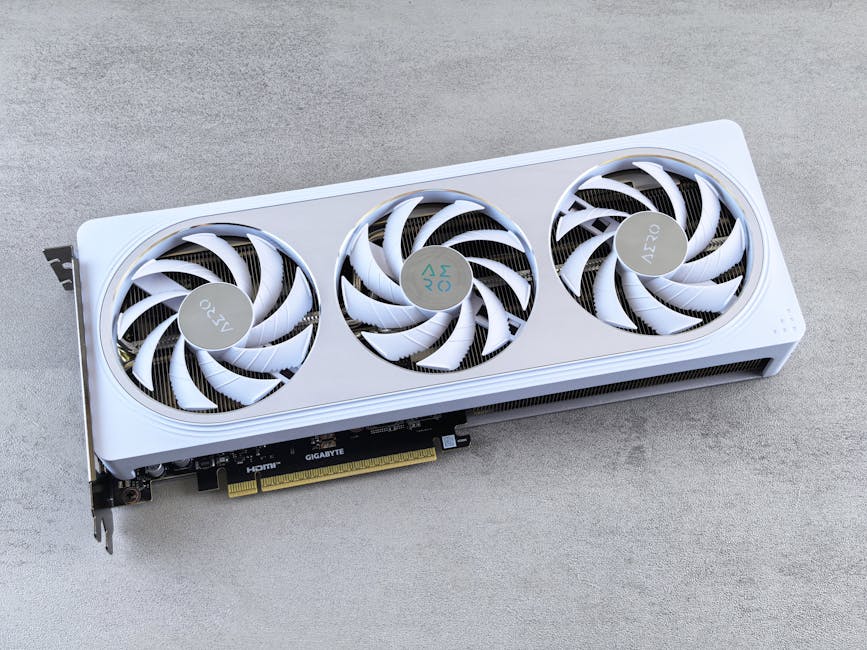
| NVIDIA RTX 4090 | 24 GB GDDR6X | ~1008 GB/s | CUDA (Mature) | $1600 - $2000+ | High-end LLM inference & fine-tuning, complex models, maximum compatibility. |
| NVIDIA RTX 4080 Super | 16 GB GDDR6X | ~736 GB/s | CUDA (Mature) | $1000 - $1200 | Serious AI development, good balance of VRAM/performance for most LLMs, cost-effective high-end. |
| NVIDIA RTX 4070 Ti Super | 16 GB GDDR6X | ~672 GB/s | CUDA (Mature) | $800 - $950 | Mid-range AI development, excellent for smaller LLMs & CV tasks, strong value with 16GB VRAM. |
| AMD Radeon RX 7900 XTX | 24 GB GDDR6 | ~960 GB/s | ROCm (Evolving) | $900 - $1100 | Cost-effective high VRAM, ideal for ROCm-optimized workloads, research, and specific ML projects. |
| NVIDIA RTX 3090 (used) | 24 GB GDDR6X | ~936 GB/s | CUDA (Mature) | $700 - $900 | Budget-conscious high VRAM, strong performance for its price, but older generation. |
Recommendations by Budget / Use Case:
- Enthusiast / High-Performance Developer: The NVIDIA RTX 4090 is the undisputed king for local AI. Its 24GB VRAM allows for larger LLMs and more ambitious fine-tuning projects without compromise.
- Serious AI Developer / Balanced Workstation: The NVIDIA RTX 4080 Super or RTX 4070 Ti Super offer an excellent sweet spot. With 16GB of VRAM, they can handle many current LLMs (e.g., 7B, 13B, smaller 34B models with quantization) and complex ML tasks while providing the robust CUDA ecosystem.
- Budget-Conscious / Experimenter (with ROCm knowledge): The AMD Radeon RX 7900 XTX is a compelling option due to its 24GB VRAM at a competitive price. However, be prepared for potential challenges with the ROCm ecosystem, which may require more hands-on configuration. A used NVIDIA RTX 3090 also offers 24GB VRAM for a great price, if you can find one in good condition.
When NOT to use this approach
While a powerful desktop GPU is fantastic for individual AI development, it's not a panacea. This approach is generally unsuitable for large-scale enterprise training of foundation models, high-throughput production inference requiring SLAs, or projects demanding elastic scaling. For these scenarios, cloud-based GPU instances (like AWS P4d/P5 instances with H100s) or dedicated on-prem server clusters are more appropriate, offering redundancy, massive parallelism, and managed services. The upfront CAPEX of a high-end desktop GPU also needs to be weighed against the OPEX flexibility of cloud resources for short-term projects or variable workloads.
Cloud vs. On-Prem Desktop: Cost-Benefit Analysis
The decision to invest in a desktop GPU for AI versus relying on cloud computing is a fundamental trade-off between control, cost, and scalability.
- When Cloud Beats Buying: For burstable workloads, specific high-end hardware (like NVIDIA H100s or AMD MI300X), or when you need to quickly scale up or down, cloud providers like AWS, GCP, or Azure offer unparalleled flexibility. You pay for what you use, turning hardware costs into an operating expense (OPEX). This is ideal for proof-of-concepts, intermittent large training runs, or when you need to access specific hardware configurations not feasible for a desktop. For complex deployments, our cloud engineering services can help optimize these choices.
- When Owning a Desktop GPU Makes Sense: For long-term individual development, continuous experimentation, privacy-sensitive data, and predictable costs, an on-prem desktop GPU often provides better long-term value. Once purchased, the marginal cost of running another experiment is essentially zero (beyond electricity). This CAPEX model offers full control over your environment, ideal for iterative fine-tuning of smaller models or local inference where low latency is critical without network overhead.
Our team often advises clients to adopt a hybrid approach: leverage cloud for large-scale training and production inference, while empowering individual developers with powerful desktop GPUs for local iteration and rapid prototyping. This balances cost-efficiency with developer productivity.
FAQ
What is the minimum VRAM for LLM inference?
For basic LLM inference, 8GB of VRAM can handle smaller models (e.g., 7B parameters) with limited context. However, for practical development, including larger models (13B+) or extended context windows, 16GB is a more comfortable minimum, with 24GB being ideal for advanced use cases.
Is AMD ROCm ready for prime-time AI development?
ROCm has matured significantly and is a viable platform for AI development, especially given AMD's competitive VRAM offerings. While its ecosystem is still catching up to NVIDIA's CUDA in terms of breadth and community support, it's increasingly capable for PyTorch and TensorFlow workloads, particularly on newer RDNA 3 GPUs.
Should I prioritize VRAM or raw compute for local LLMs?
For local LLMs, VRAM capacity is almost always the primary bottleneck. If your model and its associated data cannot fit into VRAM, raw compute power becomes irrelevant. Once you have sufficient VRAM, then memory bandwidth and compute units become important for improving inference and fine-tuning speed.
Can I fine-tune LLMs on a desktop GPU?
Yes, you can fine-tune smaller LLMs (e.g., 7B to 13B parameters) on a desktop GPU with sufficient VRAM (16GB+). Techniques like 4-bit quantization (e.g., with bitsandbytes) and LoRA (Low-Rank Adaptation) significantly reduce VRAM requirements, making fine-tuning feasible on consumer hardware. Our hire Python developers are adept at optimizing these workflows.
Ready to Power Your AI Innovations?
Choosing the optimal desktop GPU for AI development is a strategic decision that impacts your team's efficiency and project outcomes. Whether you're building new AI integrations, optimizing existing models, or scaling your machine learning infrastructure, Krapton's principal-level engineers can guide your hardware and software strategy. Building AI infra or apps? Book a free consultation with Krapton to align your technology choices with your business goals.
Krapton Engineering
The Krapton Engineering team comprises principal-level software engineers and ML practitioners with years of hands-on experience designing, implementing, and optimizing AI infrastructure and web applications for startups and enterprises globally, consistently delivering high-performance, scalable solutions.