Every serious sim rig hits the same wall eventually: your game streams telemetry to one UDP port, and the second app that wants that data simply cannot get it. SimHub grabs the feed first, and suddenly your wheelbase software, your Stream Deck, and your remote dashboard all go dark. Telemetry Relay fixes that in one stroke by splitting your telemetry to every app and device at once.
TL;DR: Telemetry Relay is a lightweight Rust app that sits between your sim racing game and your tools. It receives your game's UDP telemetry once and fans out identical, byte-for-byte copies to as many local apps and networked PCs as you want, with per-destination rate limiting and a live packet inspector. It is in public beta and free to download.
The one-port problem every sim racer eventually hits
Racing games like the F1 series and Forza broadcast their telemetry over UDP to a single address and port. UDP is fast and connectionless, which is exactly what you want for live data feeding force feedback, dashboards, and effects. The catch is that on a single machine, a UDP port can only be bound by one process at a time.
That constraint is invisible until you run more than one tool. You add SimHub for your dashboard, then a wheelbase utility that wants the same stream, then a Stream Deck plugin, then a buttkicker effect engine. The first app to claim the port wins, and everything after it silently receives nothing. People spend hours assuming a tool is broken when the real issue is that two apps are fighting over the same feed.
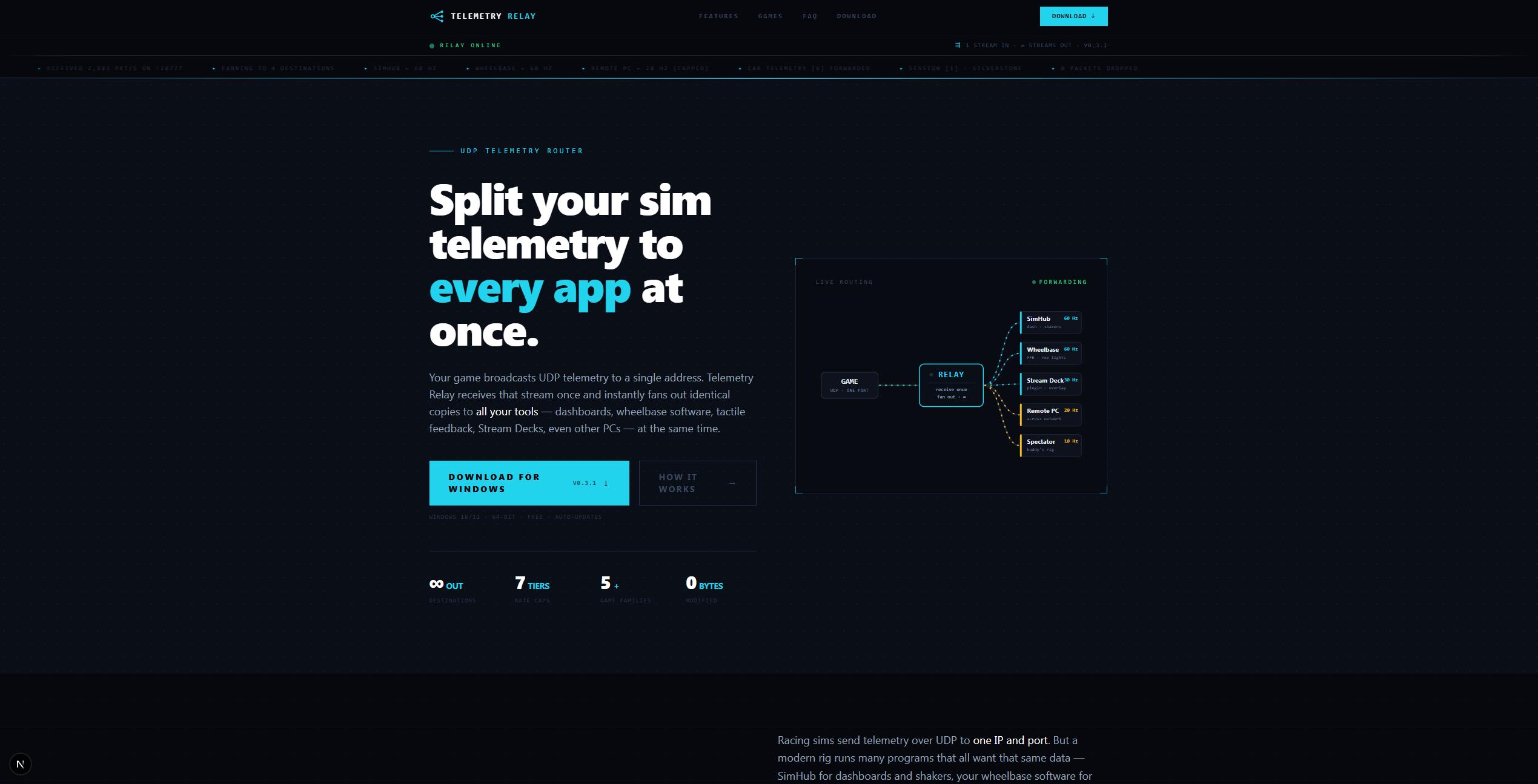
Telemetry Relay removes the fight entirely. It binds the game's port once, then rebroadcasts the data to every destination you define. Your game still thinks it is talking to a single listener, and every one of your tools gets a clean, complete copy.
What Telemetry Relay actually is
Telemetry Relay is a desktop application for Windows that acts as a telemetry splitter, or fan-out router, for sim racing UDP streams. You point your game at Telemetry Relay instead of directly at a single tool, and Telemetry Relay forwards that stream to all the apps and devices you care about, locally on different ports or across your network to other PCs, all at the same time.
It is intentionally a thin pass-through. It does not transform, enrich, or reinterpret your telemetry. The packets that leave are the same packets that arrived, which means anything that worked with the raw game feed keeps working exactly as before, just in more places at once.
Key capabilities
The feature set is built around real rig setups rather than a generic networking checklist. The headline capabilities are:
- Unlimited named destinations you can toggle on and off individually, so you can route to SimHub, a second PC, and a Stream Deck without touching the others.
- Per-destination rate limiting at 60, 30, 20, 10, 5, 2, or 1 Hz, so a lightweight remote dashboard does not have to drink from the same firehose as your force-feedback engine.
- Multi-game profiles that auto-configure the correct listen port, so switching between F1 and Forza does not mean re-reading documentation every time.
- Crash- and corruption-safe routing using separate sockets per destination, so one misbehaving target cannot poison the feed for the rest.
- A live F1 packet inspector for confirming a setup works or troubleshooting why an effect is not firing.
- Network forwarding to other PCs, for multi-machine streaming and dashboard rigs.
- Byte-for-byte pass-through that never modifies your data.
- System tray operation, autostart with Windows, and automatic in-app updates.
Under the hood: why it is built in Rust
Telemetry Relay is written in Rust as an asynchronous pass-through. That choice matters because telemetry routing runs while you are mid-corner with everything else on your machine competing for cycles. The forwarding path is deliberately minimal: receive a packet, copy it, send it to each enabled destination, with negligible overhead and no allocation-heavy processing in the hot path.
Each destination gets its own socket. That isolation is what makes the routing crash- and corruption-safe: if a downstream target stops responding or behaves badly, it does not stall or corrupt delivery to your other tools. The result is a utility that runs quietly in the system tray and gets out of your way, which is exactly what you want from infrastructure that should be invisible when it works.
This is the same engineering discipline our team brings to client work. If you are weighing a Rust-based desktop or systems tool of your own, our notes on custom software services cover how we approach low-overhead native applications.
A real-world usage scenario
Picture a typical evening on a competitive F1 rig. You launch the game and point its telemetry output at Telemetry Relay, which auto-selects the right listen port from your F1 profile. From there, one destination feeds SimHub for your dashboard at a full 60 Hz. A second destination, rate-limited to 10 Hz, forwards across your network to a tablet running a remote standings overlay on the desk beside you. A third routes to a Stream Deck plugin for pit and ERS shortcuts.
An effect is not firing on the tablet. Instead of guessing, you open the live packet inspector and watch the stream in real time to confirm whether packets are arriving and what they contain. Within seconds you know whether the problem is the relay, the network, or the downstream app, which turns an hour of trial-and-error into a quick, confident fix.
Who this is (and is not) for
Telemetry Relay is for sim racers running more than one telemetry-consuming tool, multi-PC streaming setups, and anyone who has lost time to the one-port problem. It currently targets Windows and is in public beta, so if you want a finished, multi-platform commercial product with a long stability track record, it is worth knowing it is still maturing. If you only ever run a single telemetry app and never plan to add another, you do not need a splitter at all, and that is an honest reason to skip it.
FAQ
Why can only one app receive my game's UDP telemetry?
On a single machine, a UDP port can be bound by only one process at a time. Your game broadcasts to one address and port, so the first app to claim it receives the data and any others get nothing. Telemetry Relay binds that port once and rebroadcasts identical copies to every tool you configure, which lets multiple apps share one feed.
Does Telemetry Relay add latency or change my telemetry data?
It is a byte-for-byte pass-through and never modifies your data. Built in Rust as a thin asynchronous forwarder, it copies each packet and sends it onward with negligible overhead. Because anything that worked with the raw game feed receives those exact packets, your existing dashboards, effects, and tools behave the same, just in more places at once.
Can I send telemetry to another PC on my network?
Yes. Telemetry Relay supports unlimited named destinations, including targets on other machines across your local network. You can run a dashboard or overlay on a separate PC or tablet while your main rig keeps feeding SimHub locally, and you can rate-limit each destination independently from 60 Hz down to 1 Hz.
Which games does it support and how much does it cost?
It works with sim racing titles that broadcast UDP telemetry, including the F1 series and Forza, with multi-game profiles that auto-configure the listen port. A built-in live packet inspector currently provides F1 diagnostics. Telemetry Relay is in public beta and free to download, with automatic in-app updates.
Get Telemetry Relay
Telemetry Relay is one of the in-house tools we build at Krapton, alongside our client work. You can download the public beta for free, read the full feature breakdown on the Telemetry Relay product page, or see more of what we ship across our products lineup. If you want a team to build a tool like this for you, hire a dedicated Krapton team.